
A readiness score for every Apple Watch. And training that follows it.
Apple’s Readiness app only runs on the Series 12 and Ultra 4. LeibFit turns your Apple Health data into a daily readiness score every morning – on any Apple Watch from Series 4 – and builds today’s strength and cardio training straight from it. Recovery, sleep, HRV, strain and training plan: all in one app.
Free to download. Recovery, sleep and strain stay free for you for good, after the first week too.
- No payment details
- No automatic renewal
- No account
Your watch is enough.
trackers in the app.
and illustrated.
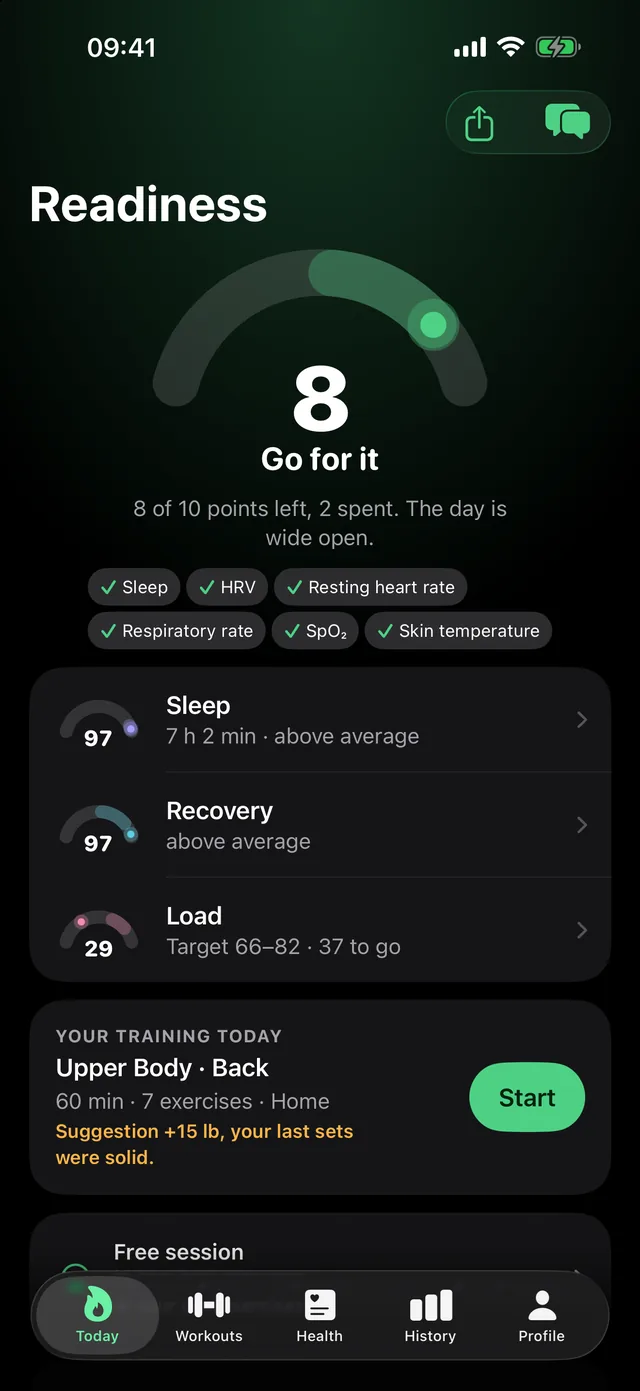
Readiness, sleep, strength and cardio. One app instead of five.
LeibFit is the readiness and training app for every Apple Watch. It reads HRV, resting heart rate, sleep and strain from Apple Health, turns them into your readiness score every morning and uses it, in the same app, to decide what you train today: how heavy in the weight room, how hard on the run or the bike, or whether today is for recovery. Health data in, finished workout out.
Daily readiness
One number every morning from HRV, resting heart rate, sleep and strain – measured against your 30-day norm. On any Apple Watch from Series 4, no new watch needed.
Sleep coach
Sleep stages, sleep need, sleep debt and a concrete bedtime for tonight instead of the blanket 8-hour rule.
HRV & vitals
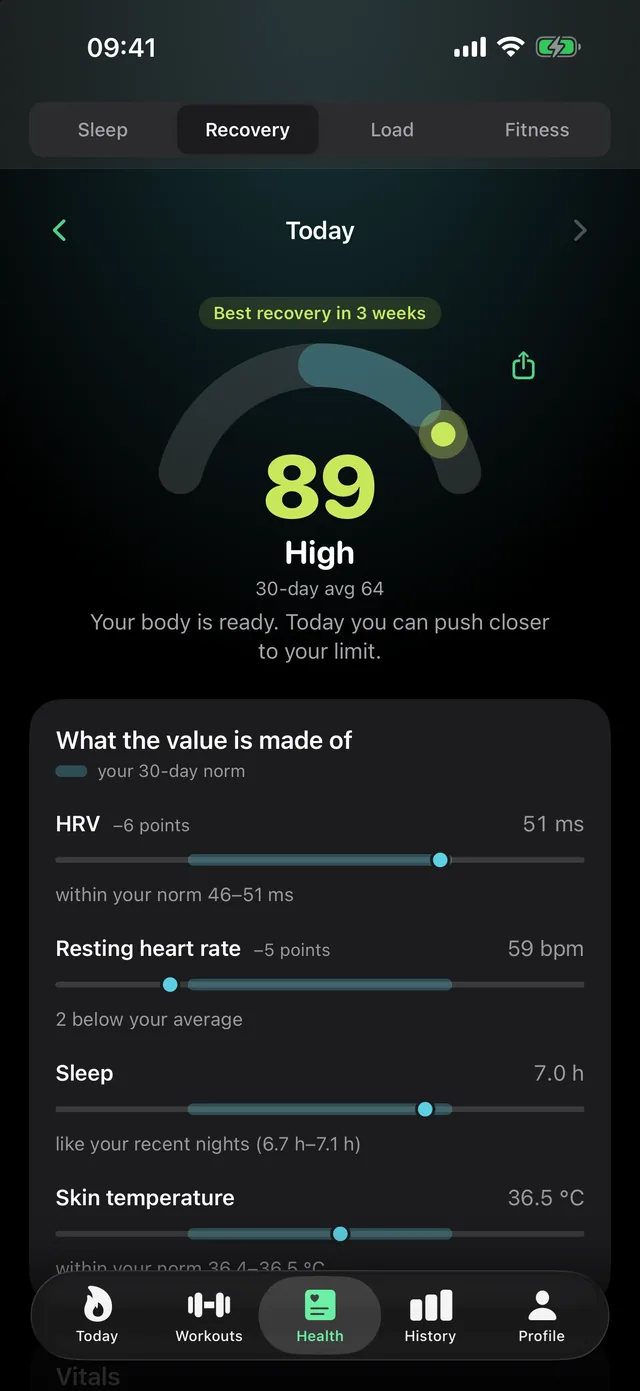
HRV, resting heart rate and further vitals over time, each against your own norm. You see what pulls your readiness up or down.
Strength training that thinks along
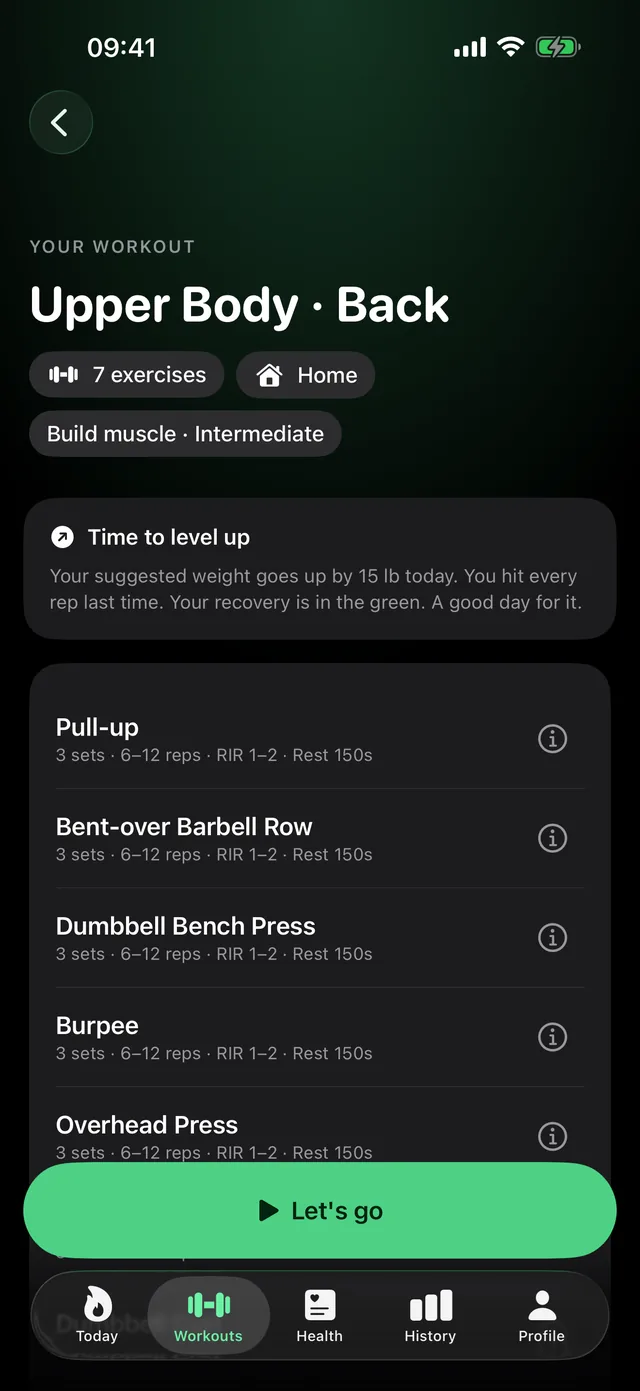
A plan for your real equipment. If your sets landed and your readiness is good, the weight goes up. If recovery is low, the increase waits. Strength work counts toward your strain, too.
Running & cycling
Today’s cardio session with duration, heart rate zone and pulse window – matched to your recovery, your strain so far and any strength session on the same day.
On your wrist
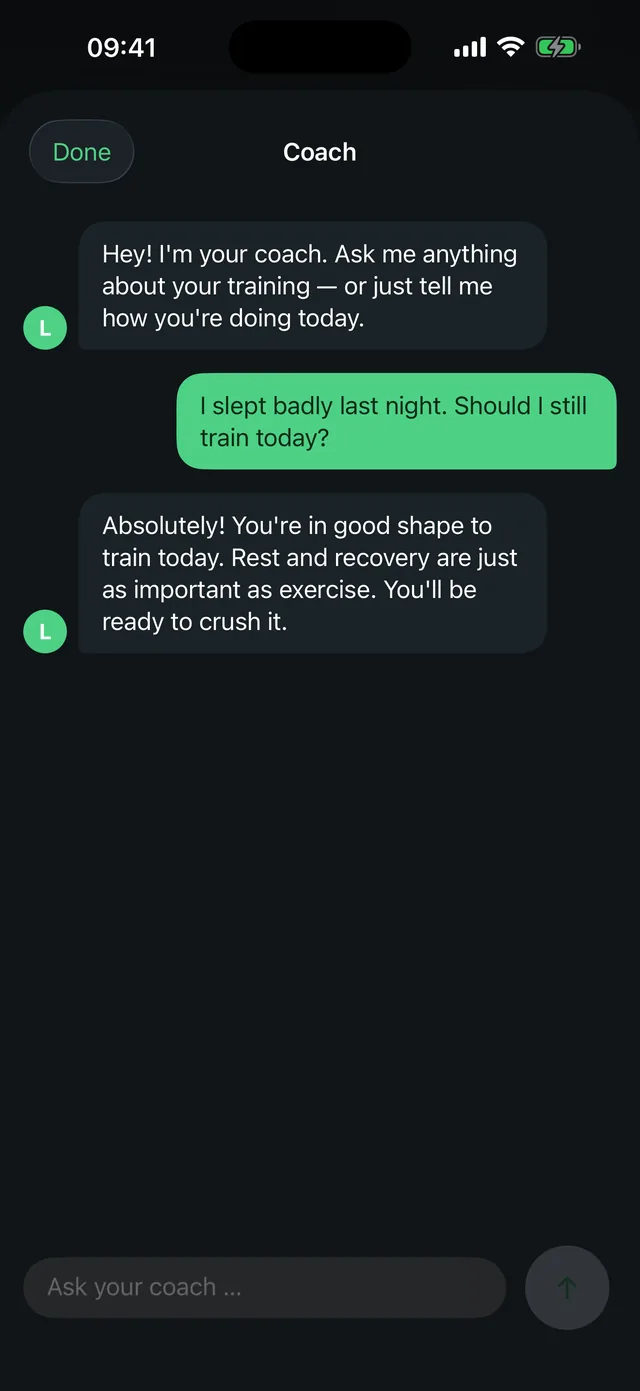
The Apple Watch app shows readiness and today’s workout; you tick off sets on your wrist. Plus morning journal, history and AI coach – all in the same app, no account.
Until now, recovery lived in one app, the training plan in the next and the run in a third – and none of them knew about the others. In LeibFit everything hangs on the same readiness: it decides the weight on the bar, the zone on your run and the day you are better off resting. That is how measuring finally turns into training.
Apple’s own Readiness app requires a Series 12 or Ultra 4 (as of 10/2026). LeibFit calculates its readiness itself, from the numbers each of these watches writes to Apple Health – the Amazfit Helio Strap works too. Readiness without a Series 12: the comparison →

One number tells you how you're doing today
Your daily score bundles sleep, recovery and strain into one target for the day – measured against your own 30-day norm, not other people's averages. Your morning journal then shows you what lines up for you: alcohol, stress, caffeine, sauna, always with an effect size and never sold as a cause.
Behind it stand three values you can open up individually, any time, in the Health tab:
How much of your personal need you actually covered.
From HRV, resting heart rate and sleep – against your own 30-day norm.
What the day has cost you, plus a target range for today.
This is guidance for your training, not a medical diagnosis. The Health tab shows what pulled each value up or down. LeibFit works with the data in Apple Health, whichever compatible wearable provides it. You need no extra hardware and no second subscription for it. That holds even when your watch is too old for Apple’s own readiness score: Readiness without a Series 12 → · More on HRV and the recovery score →
From nothing to your first score: one night
You open no account and order nothing. What you need is already on your wrist.
Grant Apple Health access
One dialog, one tap. LeibFit reads sleep, HRV and resting heart rate from the watch you already own: Apple Watch or any wearable that writes to Apple Health.
about 1 minuteSay once what you have
Dumbbells, barbell, machines, bands or bodyweight only, per training location. After that LeibFit never plans an exercise you can't do.
about 2 minutesSleep on it once
Next morning your three numbers and today's workout are on the first screen. You don't even have to open the app first.
next morningLeibFit knows when you can push – and when to recharge instead
LeibFit works out your recovery from 0 to 100 from HRV, resting heart rate and sleep. For sleep you get your need and a concrete bedtime for tonight instead of a blanket 8-hour rule. Your strain from 0 to 100 comes with a daily target that follows your recovery. Strength training counts too, not just what your pulse gives away: heavy sets barely move your heart rate but still cost you.
Guidance, not diagnosis. It works with any wearable that writes to Apple Health. You need no extra hardware and no second subscription for it.
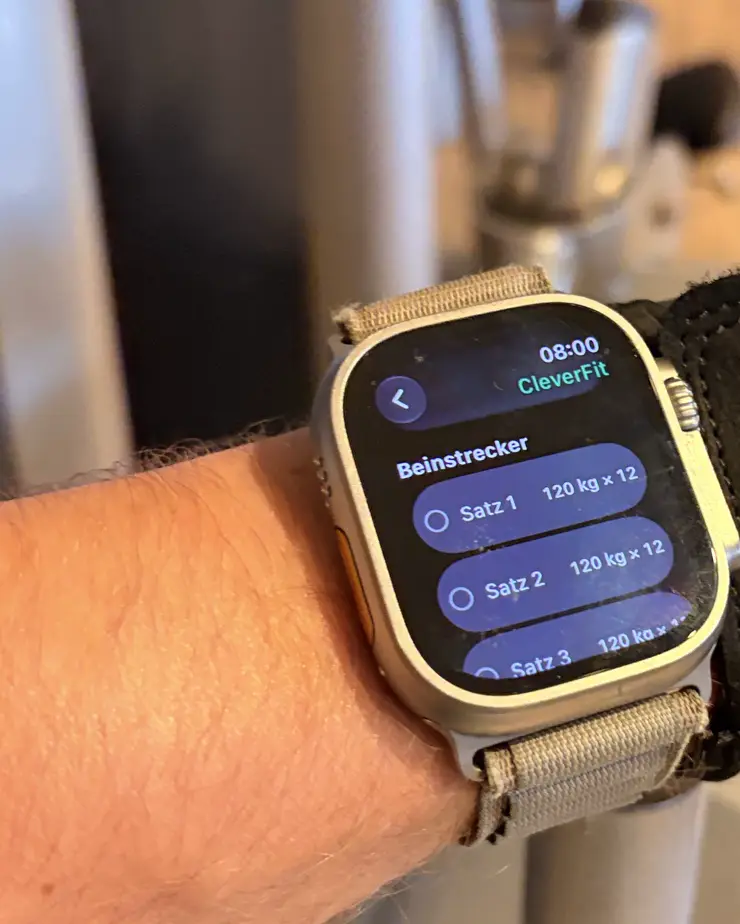
Even when the iPhone stays in your pocket
On Apple Watch you get your three numbers and today's workout. You tick off sets without picking up your phone. The rest timer runs on your wrist, and heart rate and elapsed time are right there during the session. The watch records the workout and writes it to Apple Health.
If your iPhone is somewhere else, ticked-off sets aren't lost. They travel over as soon as it's back in range. watchOS 10 or newer, included in the price: you pay no second subscription for the watch.

The morning decides the day, not how you feel at 6pm.
Your numbers are there before you open the app. What you make of today sits right next to them.
AI coach or build it yourself
Have your weekly plan built for you, or build it day by day yourself. Exercises, sets, reps, weight, rest: you have full control whenever you want it.
The AI coach plans for you
A few questions in chat, then your weekly plan is ready. The coach runs on Apple Intelligence directly on the device. Your answers never leave your iPhone.
Or build it yourself
For anyone who would rather decide themselves. Every exercise, every set, every weight, every rest period: your call. Like your old spreadsheet, just faster.
Your plan knows your equipment
Tell it once what you have: dumbbells, barbell, machines, bands, or just bodyweight. LeibFit only plans with what's actually there, at home, at the gym, or a mix of both.
execution cues.

Running and cycling are part of your plan now
Tell LeibFit which days you run or cycle, and whether you want to build a base or get faster. It works out today's session from that: duration, heart rate zone and pulse window, tuned to your recovery, your strain so far today, and a strength workout on the same day.
Once you've run or ridden, LeibFit recognizes the session and shows you your result instead of the recommendation.
Train without keeping count
And you always see what you managed last time.
Everything at a glance
The whole session at a glance, every set ticked off with a tap. That's exactly why many people stick with their spreadsheet. Here you get the same thing, just better.
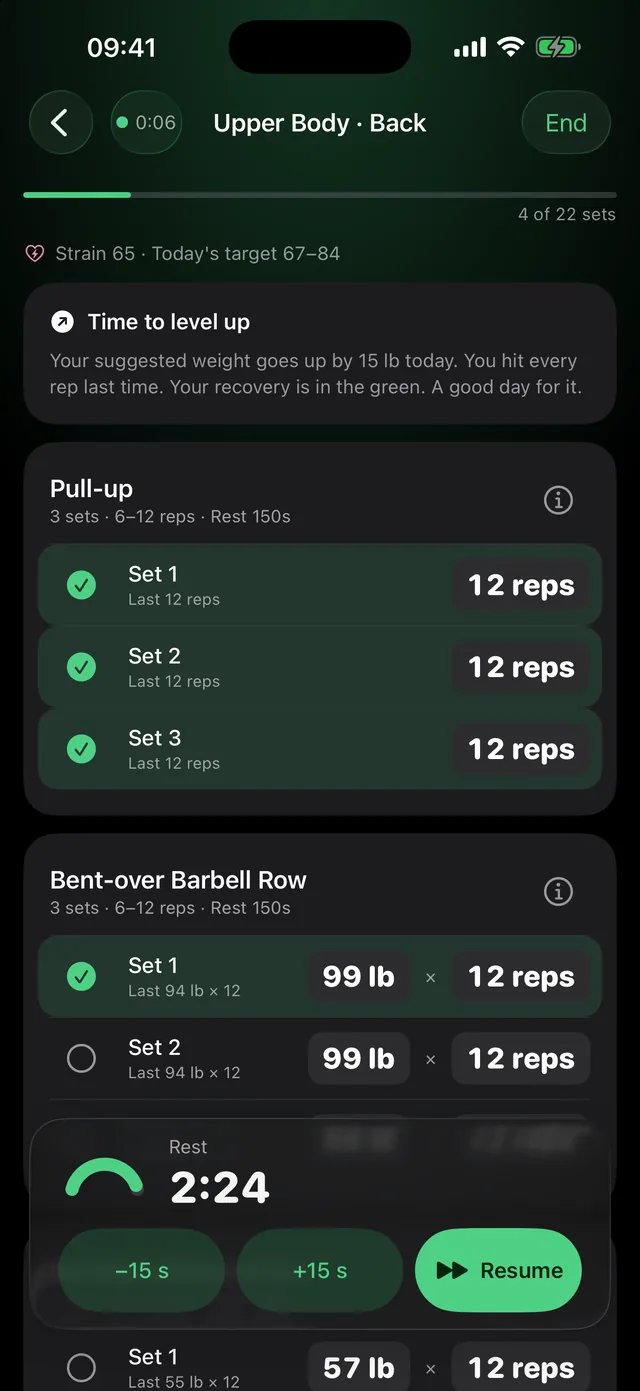
Suggestions that think ahead
Hit all your reps, and the weight goes up a notch next time. If your recovery is in the tank, the increase waits. Always explained, never silent, and capped by your real equipment.
It starts by itself after every set and keeps running in the background. The alert comes through even if the app was closed long ago. Even big apps fail at this.
Sleep, strain, coach – here's what it looks like
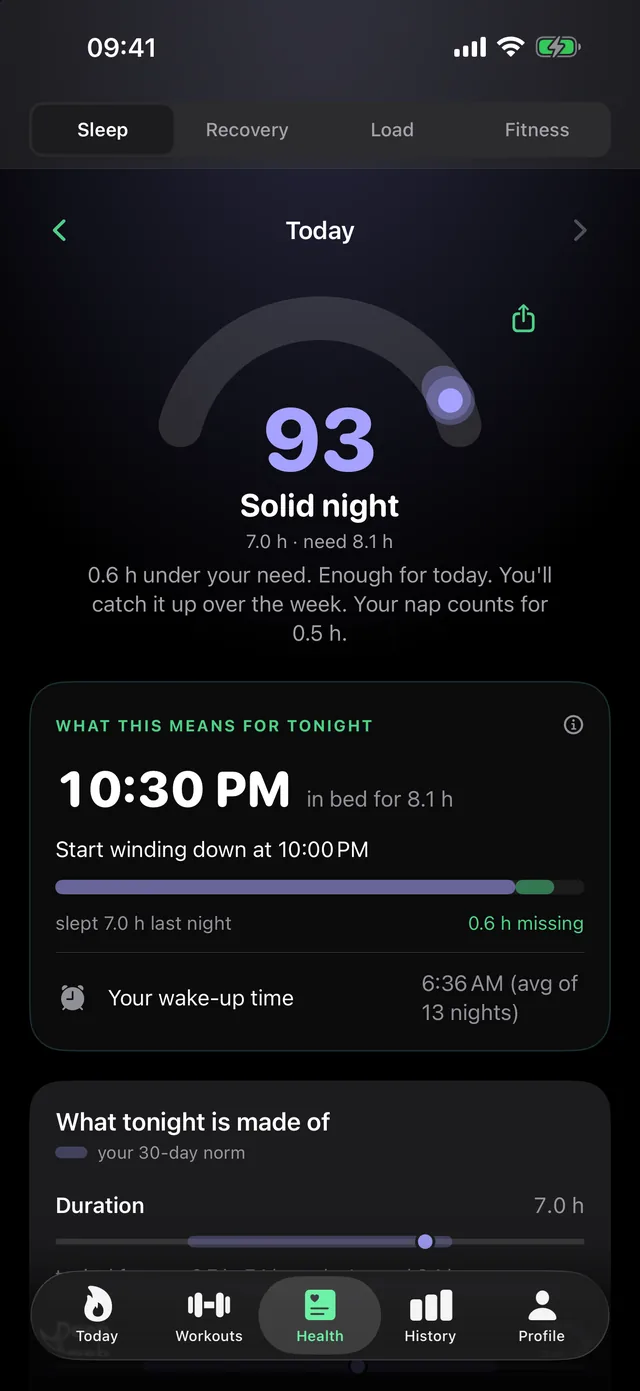
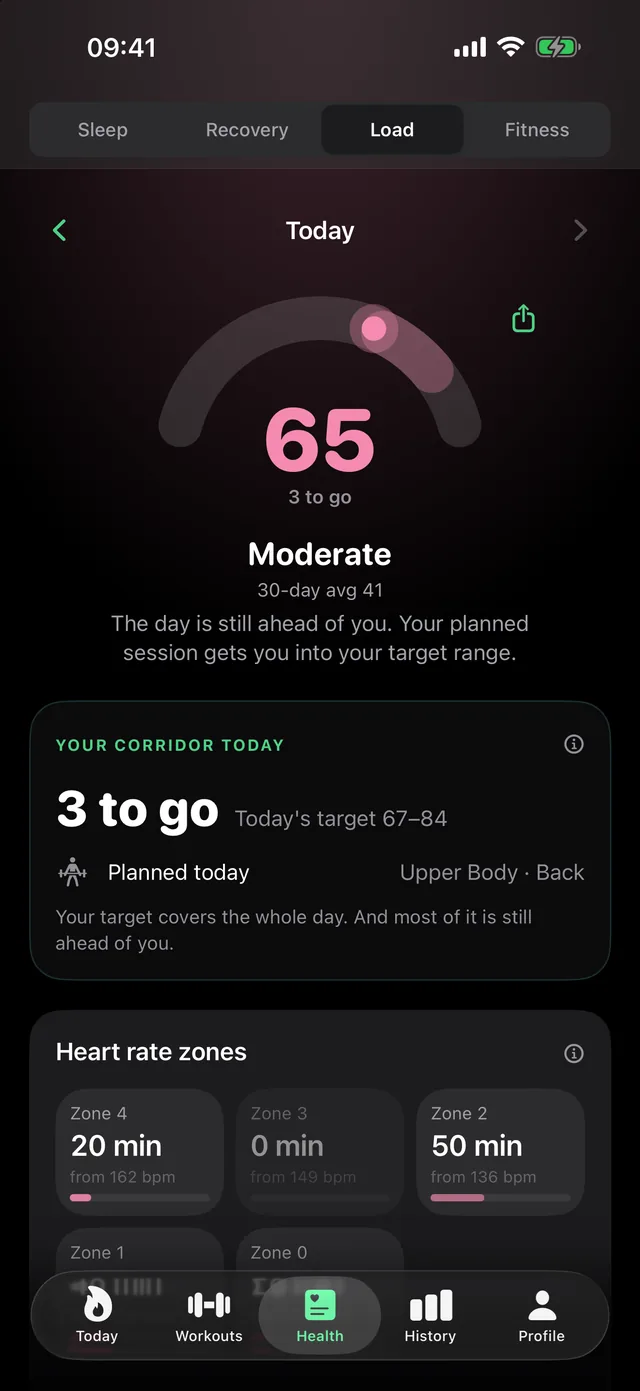
Watch your progress grow
Volume per week, sessions, sets per muscle group, as clear charts. Completed workouts land in Apple Health. And if you feel like it, you turn a week, a workout or your day into an image to share, straight from the app and with no account.
Your data belongs to you
Everything stays on your iPhone: your training, your equipment, your history. LeibFit uploads none of it, evaluates nothing about you, and needs no account, no server and no analytics SDK to do it.
Questions & answers
Do I need any extra hardware for LeibFit?
No. LeibFit works out recovery, sleep and strain from the data your smartwatch already measures. It works with the Apple Watch and any wearable that writes its data to Apple Health. You need no extra wristband and no second subscription for the analysis.
Can I get a readiness score without an Apple Watch Series 12?
Yes – with its own calculation on its own scale. Apple's readiness feature requires an Apple Watch Series 12 or Ultra 4, because it is tied to their new sensing hardware (as of 09/2026); the Series 11, Ultra 3 and older models run the same watchOS and do not get it. LeibFit instead computes its recovery score from 0 to 100 out of HRV, resting heart rate and sleep in Apple Health – on any Apple Watch from Series 4 on. LeibFit does not read Apple's number and does not reproduce it.
What is a good alternative to Apple's Readiness app for older Apple Watches?
LeibFit. Every morning it calculates your readiness (a recovery score from 0 to 100) from HRV, resting heart rate and sleep in Apple Health – on any Apple Watch from Series 4, including the Series 9, 10 and 11, SE, Ultra, Ultra 2 and Ultra 3, which do not get Apple's Readiness (as of 10/2026). Rather than just displaying the number, LeibFit turns it into your strength and cardio training in the same app.
How does LeibFit adapt my strength and cardio training to my readiness?
In strength training through weight progression: if you hit all your reps and your recovery is good, the weight goes up one step next time; if recovery is low, the increase waits – always explained and capped by your real equipment. For running and cycling, LeibFit calculates today's session with duration, heart rate zone and pulse window, matched to your recovery, your strain so far and any strength session on the same day. Strength work counts toward your daily strain.
Do I still need a separate sleep, HRV or workout plan app next to LeibFit?
No. LeibFit combines daily readiness, recovery, a sleep coach with sleep stages and bedtime, HRV and resting heart rate, daily strain, a strength training plan, running and cycling sessions, a morning journal and an Apple Watch app in one app. All data stays on your iPhone, with no account and no cloud.
What does LeibFit cost?
Downloading and using it costs nothing. Your three morning numbers (recovery, sleep and strain), the morning journal, the export and the share cards stay free for good, with no subscription and no payment details. You only pay once you want more: starting a workout, the plan builder, the adjustment to your recovery, the fitness lens, your own baseline and the journal correlations are LeibFit Premium at €6.99 per month or €44.99 per year, cancel any time via the App Store. Everything is open for the first week, so you have seen it first.
Do I need a subscription for the free trial?
No, and you are not thrown out of the app afterwards either. You download LeibFit with no subscription and no payment details, and everything is open for the first week. After that nothing dramatic happens: recovery, sleep, strain and journal keep working exactly as before. Only training, the fitness lens and your own baseline carry a lock. Nothing is charged, there is nothing to cancel, and your data stays on your device.
Does LeibFit work without an account and without the cloud?
Yes. You open no account and register nowhere. Your training, your equipment and your health data stay entirely on your iPhone. There is no server anything gets uploaded to, and no analytics SDK inside the app.
How does LeibFit calculate my recovery?
Every morning you get a recovery score from 0 to 100. LeibFit works it out from your heart rate variability (HRV), your resting heart rate and your sleep, and always compares against your own 30-day norm rather than other people's averages. The score is guidance for your training, not a medical diagnosis.
Can I build my own training plan, or does the AI create it?
Both. The AI coach puts together a weekly plan after a few questions, containing only exercises that match your actual equipment, whether home gym, studio or bodyweight only. Or you build every training day yourself: you decide the exercises, sets, reps, weight and rest.
Can LeibFit read the data from my Amazfit band?
Yes, and directly since version 1.7: LeibFit reads your Amazfit Helio Strap itself at night over Bluetooth, with no detour through the Zepp app. Or you take the Apple Health route. Then the Zepp app writes the night data there and LeibFit works with it. The Helio Strap guide page explains the difference between the two routes.
What devices does LeibFit run on?
LeibFit runs on iPhone from iOS 17.6 and on Apple Watch from watchOS 10. For the AI features (coach chat and plan generation) you need an iPhone with Apple Intelligence and iOS 26. Planning, logging, history, recovery, sleep and strain all work without AI too.
Is there a LeibFit app for Apple Watch?
Yes. On the watch you get your three numbers for the day and today's workout: tick off sets without picking up your phone, the rest timer runs on your wrist, and you see heart rate and elapsed time during the session. The watch records the workout and writes it to Apple Health. If your iPhone is somewhere else, ticked-off sets aren't lost – they travel over as soon as it is back in range. Plus a complication for your watch face. The watch app is included in the price; there is no second subscription.
If you want the detail

Today's weight is already decided.
All that is left is showing up.
Get LeibFit and start today
Your three numbers every morning, free. Training plan and fitness lens when you want more.